Your first week with Mitta
In short
Answer a short set of questions and Mitta builds your week and your daily food targets. Do your first workout from Today, choosing your own starting weights where Mitta has none. Log your first meal by typing it, searching or scanning a barcode. Today shows these as three first steps and ticks them off for you.
 Cody de LeeuwLast checked 27 October 2026 · 6 min read
How do you set up your plan?
The first time you open Mitta, it asks a short list of questions, with buttons to answer. The screen says About 2 minutes. The questions are fixed. No AI is involved at this stage.
You are asked, in this order:
- What to call you (optional) and your main goal: Build muscle, Get stronger, Lose fat, Improve fitness or General fitness.
- How long you have trained with weights: Beginner (under 6 months), Intermediate (6 months to 2 years) or Advanced (over 2 years). If you are unsure, pick the lower one. Mitta suggests moving up when you are ready.
- Which days you can train, how many minutes per workout (45, 60, 75 or 90) and where you train.
- Optional: a rough weight for about 8 reps on bench press, squat and deadlift, so Mitta can pick starting weights. This question only appears if you train in a gym and are not a beginner. You can skip it.
- Optional: any complaints Mitta should work around, and up to three muscle groups that need extra attention.
- Cardio per week and which kind.
- Your country, sex, birth year, height, weight and how active you are outside training. Mitta uses these to estimate your energy use. You must be 18 or older.
- For Lose fat and Build muscle: an optional target weight and how fast you want to get there.
If you prefer a form, tap Form at the top. It asks the same things on separate screens. At the end you see a summary. Tap a line to change it, then tap Create my program.
The number of training days sets the split:
| Training days | Split |
|---|---|
| 1 to 3 | Full body |
| 4 | Upper/lower |
| 5 or more | Push/pull/legs |
If you have a complaint that affects training, Mitta leaves out exercises that often aggravate it. If pain lasts, see a doctor or physiotherapist.
What you see when your program is ready
The next screen is Your program is ready. It shows:
- Your week: the days with a workout, plus a few lines on why the plan looks this way.
- Your first workout, with the day it falls on, and the first exercises. Where Mitta has a starting weight it shows it. Where it has none, you see sets and reps and choose the weight yourself.
- Your daily target: calories, protein, carbs and fat.
- A target weight and an approximate date, if you gave one.
The ending has two buttons. Get started takes you into the app. View and adjust programme opens your week first. At the bottom there may be a question about notifications. You can also leave that for later.
None of this is final. You can change the days, the exercises and the targets afterwards.
What do you see on Today?
Until you have done a workout and logged a meal, it shows a card called Getting started with Mitta. It reads First steps, 0 of 3 done and has three lines:
- Do your first workout. It names the workout that is ready today, or the next one in your week. If nothing is planned, it offers a free workout.
- Turn on notifications, for a reminder on your training days. Where your browser or app cannot do that, this line becomes Preview your first workout.
- Log your first meal.
The steps tick themselves off when there is data. Tap the cross on the card to hide it. A message with an undo button appears.
The main tabs are Today, Week, Food, Progress and Coach. Your workouts are under Week. The plus button opens Quick add, where you can log food, start a workout, log an activity or log your weight.
Mitta also offers a short tour. You can replay it from Settings.
How do you do your first workout?
- Tap the first step on Today, or open the workout under Week. You see a preview: the number of exercises, working sets and estimated minutes, with the exercises below.
- Tap Start workout.
- Per exercise you see a Suggestion with a weight and reps. Tap Why? to see where it comes from. The first time there is no suggestion yet. The screen says to pick a weight you can do the reps with, with 2 to 3 reps left in the tank.
- Tap the weight and reps to set them. Tap the circle on the right to complete the set. The rest timer starts on its own.
- When an exercise is done, Mitta asks How did the exercise go? with Easy, Good, Hard and Pain. Your answer adjusts the suggestion for next time.
- Tap Finish at the top right when you are done.
Tap Details to add more to the next set: set type, effort, tempo, pain or discomfort, and a note. This is optional.
A few things to know on day one. A machine taken? Tap the name of the exercise and choose Swap for. Flag pain under Details. With moderate pain or more, Mitta shows alternatives and starts lighter next time. If you feel sharp pain, stop the exercise and talk to a healthcare professional.
On the summary you can add how it felt and a note, then tap Done. For a first workout the summary says Your starting point is set. Next time you see your progress against it. After a workout, if you hit the top of the rep range on every set, the next suggestion is heavier.
How do you log your first meal?
Open Food and pick a way to log. All of them work on every plan.
- Type it. The bar at the top says What did you eat? E.g. 2 eggs and toast. Tap the arrow and Mitta turns the text into a plate with one line per food. Check the portions, then tap the button that says how many items to log. On Free and Pro the matching is done without AI.
- Search. Tap the plus next to a meal (Breakfast, Lunch, Dinner or Snacks), then type in Search product or brand. Choose the food and the amount.
- Scan a barcode. If the barcode is not found, you can photograph the label or enter the values yourself.
- Enter it yourself. Use Log calories for something where you know the numbers, or Your product to copy values from a label.
Mitta asks which country you live in during setup. That is so it searches the food data of your country first.
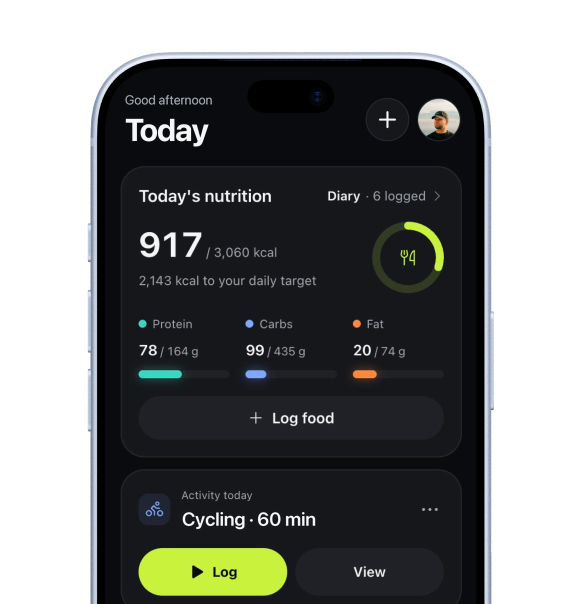
Once logged, the top of the Food screen shows your calories and protein against your daily target, with a ring. Swipe a line to delete it. A message with an undo button appears. The next time you eat the same food, it is under Recent with your last amount.
Photos of your plate and reading labels with AI need Pro + AI coach.
What else is worth doing this week?
- Weigh yourself. Use the plus button, then Log weight. Weigh in the morning after the toilet and before breakfast if you can. Mitta looks at the 7-day average. A trend needs a few measurements, so a single number says little.
- Look at Week. This is where you move a workout to another day: hold it and drag. If you miss a day, the workout can be planned again.
- Look at Progress after your first workout. Before that it is empty. Afterwards it shows strength per exercise, sets per week and your records.
- Log food on most days. Mitta works out your real energy use from what you eat and how your weight moves. It needs 10 logged days and 5 weigh-ins spread over at least 10 days. So it will not show in week one. This is part of Pro.
What do the plans include?
Mitta has three plans: Free, Pro and Pro + AI coach. Prices are not set. Mitta is in beta, as a web app for invited testers. If you were invited with a test code, Mitta tells you after login, for example Your test plan is on: Pro until a date.
| What you use in week one | Free | Pro | Pro + AI coach |
|---|---|---|---|
| Plan and daily targets | Yes | Yes | Yes |
| Log workouts, weight suggestions, exercise videos | Yes | Yes | Yes |
| Check-in before your workout | Yes | Yes | Yes |
| Log food: search, barcode, text | Yes | Yes | Yes |
| Charts | 90 days | 1 year | 1 year |
| Training blocks with a deload week | No | Yes | Yes |
| Your real energy use and the Weekly check | No | Yes | Yes |
| Quick logging with a photo, AI coach | No | No | Yes |
Everything you need for the steps above is on Free. For the full list, see Free, Pro and Pro + AI: what is included.

How Mitta does it
A week that is ready on day one.
Mitta turns your answers into a week of workouts and a daily food target, and shows you why before you start. Today then walks you through the first three steps.
- Short setupFixed questions with buttons, about 2 minutes. Or use the form.
- Your week and targetsWorkout days, a first workout and calories, protein, carbs and fat.
- First steps on TodayWorkout, notifications and first meal, ticked off for you.
- Change it laterDays, exercises and targets can be adjusted after setup.
Start with the first three steps.
Answer the questions, do one workout and log one meal. Free to start, in the web app for invited testers.
Questions about
Your first week with Mitta
Can I change my plan after setup?
Yes. You can change the days, the exercises and the targets afterwards. The first screen after setup says so, and View and adjust programme opens your week.
Do I have to do the questions first?
Yes. Mitta builds your week and daily targets from your answers. You can pick the form or the question chat, but not skip both.
I do not know what weight to start with.
That is normal. Skip the starting-weights question. In your first workout, pick a weight you can do the reps with, with 2 to 3 reps left. After that, Mitta works out your next weight.
Does the first steps card go away?
It disappears when all three steps are done, or when you tap the cross to hide it.
Can I use Mitta on my phone?
The web app works for invited testers. On a phone you can add it to your Home Screen: tap Share, then Add to Home Screen. It then opens full screen, and training and logging work offline.
Sources
Written by Cody de Leeuw. First published 27 October 2026, last checked 27 October 2026. This article is general information, not medical advice. Spotted a mistake? Tell me