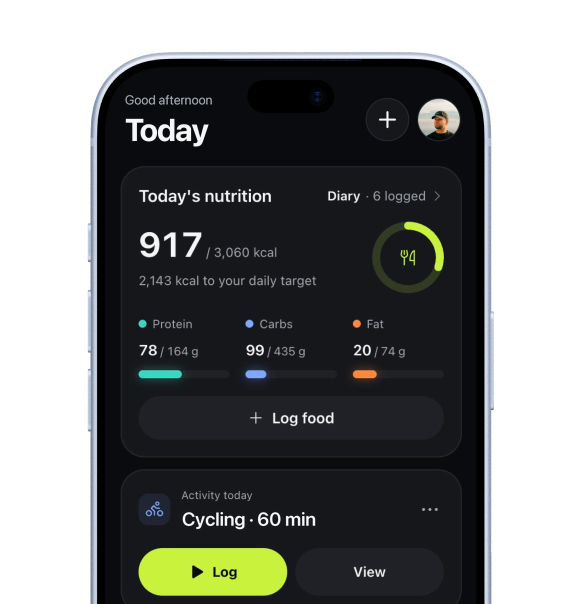
How to log cardio and sports
In short
Tap the plus button, choose Log activity and pick a sport. Fill in the duration, and for some sports a distance. Heart rate, effort and a note are optional. Save it and it shows up in Progress, on the Cardio tab. Logging cardio and sports is free.
 Cody de LeeuwLast checked 27 October 2026 · 5 min read
How do you log a run, a ride or a sport?
- Tap the plus button (Quick add) and choose Log activity.
- Pick a sport from the tiles at the top. Tap More sports for the full list.
- Tap Duration and set hours, minutes and seconds, then tap Done.
- Add a distance if the sport has one. Heart rate, effort and a note are optional.
- Check Started at. It starts 30 minutes ago, so a workout you just finished is about right. Change it if not.
- Tap Save. The save button says Enter the duration first until the duration is above zero.
You see Cardio saved with the minutes, and a View button that takes you to Progress. If you started from the plus button on the Today screen, the notification has an Undo button instead.
The five tiles are your most frequent sports of the last 90 days. Until you have some history they fall back to running, cycling, swimming, walking and HIIT. Mitta also remembers the sport you logged last, so the next time that one is already selected.
Which sports can you log?
There are 49 in the list, including Other sport. They sit in ten groups:
- Running and walking: running, walking, hiking.
- Cycling.
- Water: swimming, rowing, canoeing and SUP, surfing, sailing, water sports.
- Racket sports: padel, tennis, squash, badminton, pickleball, table tennis.
- Team sports: football, hockey, basketball, korfball, volleyball, handball, rugby, American football, baseball, cricket, water polo, ultimate frisbee.
- Fitness and dance: HIIT, cross training, bootcamp, elliptical, stair climbing, jump rope, dance.
- Yoga and flexibility: yoga, Pilates, stretching and mobility.
- Martial arts: boxing, kickboxing, martial arts.
- Winter and skating: skiing, snowboarding, skating.
- Other: climbing, golf, horse riding, gymnastics, other sport.
In the picker you can search. It also knows other names: typing spinning finds Cycling, boulderen finds Climbing, and judo finds Martial arts.
What can you fill in?
| Field | What it is |
|---|---|
| Duration | Required. Hours, minutes and seconds. |
| Distance | Only for sports that have one: km for running, walking, hiking, cycling, rowing, canoeing and SUP and skating. Metres for swimming. |
| Avg. heart rate, Max. heart rate | Optional, in bpm. You type them in. |
| Started at | Date and time. Change it to log something from earlier. |
| Effort (1–10) | Optional. Tap a number, tap it again to clear. |
| Note | Optional, for example route, feel or weather. |
The other 41 sports have no distance field. Padel, yoga and football are logged by time, effort and heart rate.
The effort scale comes with a short hint: 1 is very easy and 10 is all out. Up to 3 means you can talk comfortably, up to 6 you can still talk in sentences, up to 8 only short words, and above that you can’t talk.
How do distance and pace work?
When you enter a distance, Mitta works out pace or speed from it and shows it under the fields. The unit depends on the sport:
- Running, walking, hiking: pace per km and speed in km/h.
- Cycling, canoeing and SUP, skating: speed in km/h.
- Rowing: pace per 500 m.
- Swimming: pace per 100 m.
Example: 5 km in 30 minutes is a pace of 6:00 per km and a speed of 10.0 km/h.
If you switch sport after typing a distance, Mitta converts it between km and metres. A sport without a distance does not save one, even if you typed a number first.
Where do you see it afterwards?
Open Progress and choose the Cardio tab. It shows:
- By sport this week: a ring with your minutes this week against a guideline line of 150 minutes per week, the four weeks before as small bars, and a row per sport with minutes, distance and pace. The guideline is a measure, not a target Mitta sets for you.
- This week: distance, time and number of workouts.
- Distance per week for the last 12 weeks.
- Pace over time, for running, walking, hiking, cycling and swimming, once you have at least two logs with a distance.
- A list of your workouts. Once you have logged more than one sport you can filter on one.
Tap a workout in the list to see its details. There you can delete it. Right after, a notification offers Undo.
What does it change in your plan and food targets?
Less than you might expect, and it is better to know that.
- Your lifting plan. The plan Mitta builds for you is a strength plan. Mitta does not generate running or cycling programmes. You choose what to log, or plan a sport on a day yourself with Plan an activity in the plus menu. A workout you plan shows up on that day.
- Your food targets. Targets that move with your training count days with strength training. A run does not make a day a training day, and no calories are added for cardio.
- Your lift targets. These come from your lifting history. Cardio does not change them.
What cardio does do: it sits in your history next to your lifting, it shows up in Progress, and the coach can see the minutes per week in the summary it works from, if you use the coach.

How Mitta does it
Your runs and sports, next to your lifting.
Mitta keeps cardio and sports in the same history as your workouts. You log the basics in a few taps and see the week per sport in Progress.
- 49 sportsIn ten groups, with search and your most frequent ones on top.
- Pace worked out for youPer km, per 500 m, per 100 m or in km/h, depending on the sport.
- Week per sportMinutes, distance and pace per sport, with the four weeks before.
- Undo and deleteUndo after a quick log, and delete any workout from the Cardio tab.
Lifting and cardio in one place.
Log your runs, rides and sports next to your workouts. Free to start, in the web app for invited testers.
Questions about
How to log cardio and sports
Is logging cardio free?
Yes. Logging a sport by hand, and the Cardio tab in Progress, are in the Free plan. Pulling workouts in automatically from Apple Health or Health Connect needs Pro.
Can I log something I did yesterday?
Yes. Change Started at, or open the plus menu from an earlier day. You cannot log a sport on a day that has not happened yet; you can plan one instead.
Why is there no distance field for my sport?
Only 8 of the 49 sports have one: running, walking, hiking, cycling, rowing, canoeing and SUP, skating and swimming. The rest are logged by duration, effort and heart rate.
Does cardio count as a training day for my food targets?
No. The move with training only follows days with strength training.
My sport is not in the list.
Choose Other sport and put the name in the note.
Sources
Written by Cody de Leeuw. First published 27 October 2026, last checked 27 October 2026. This article is general information, not medical advice. Spotted a mistake? Tell me